
Showing posts with label LinkedIn. Show all posts
Showing posts with label LinkedIn. Show all posts
Monday, 20 February 2017
LinkedIn For Business Step by Step Online Video Tutorial for Beginners a...
How many of you are using LinkedIn for marketing purposes? Have you had much success? Share your success stories below.

Wednesday, 8 February 2017
11 Social Media Tactics That You Should Test Today
There are hundreds of social media tactics to choose from.
The thing is, if you've been marketing for a while, you've probably tried most of them already.
- Post at the optimal time
- Share engaging content
- Create a conversation
- Share visuals...
The list can go on and on.
Now don't get me wrong, all work to a degree. But if they're that well-known, how are they going to help you stand out?
The good news is that there's still quite a few overlooked, but effective tactics you can add to your strategy.
Below I share 11 of my favorite social media marketing tactics that you should test today.
11 Social Media Tactics That You Should Test Today
1. Providing Customer Service Through Social Media
Did you know that 67% of consumers use social media for customer service?
It gets even better: 66% stopped doing business with a company because they weren’t happy with their social customer service.And it's easy to see why.
Just imagine: you want to buy a particular pair of shoes, but don’t know how much they cost. You visit that shop’s Facebook page and send a message (or write a comment), asking about the price.
Now let's look at the two possibilities:
1. You get a message with the info you’ve been looking for. Great! If you're happy with the price, you'll probably go ahead and purchase those shoes. In fact, you may even buy the shoes if the price is high - all because you'll feel good about the company.
Now let's consider the opposite situation:
2. You never hear back from the company. Will you still buy those shoes? Probably not! Nobody likes to feel ignored and not valued by a brand.
That is why, quite often, customer service on social can make or break your business.
And companies like Xbox are finally realizing that social media platforms are the ultimate tool for providing customer service.
2. Using Cover Photos for Usual Promotion
Social media profiles are highly visual.
But there’s one particular element on the page we always notice first: the cover photo.
That's a lot of visual real-estate and you should tap into it.
In fact, many organizations use cover photos to promote events, discounts, webinars, etc.
Look at cover photo for Backlinko:
In fact, many organizations use cover photos to promote events, discounts, webinars, etc.
Look at cover photo for Backlinko:
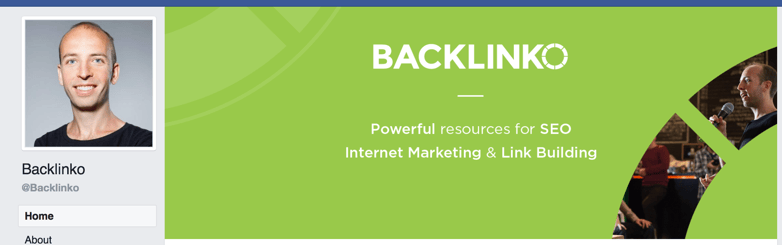
Their cover photo explains exactly what they do.
Unfortunately, many businesses are still missing out on a big opportunity. They don't use their covers to promote regular content, such as blog posts, infographics and videos.
So, consider changing your cover photo for each of your posts or events. It's not that hard, especially with the help of all the free online tools available to marketers.
So, consider changing your cover photo for each of your posts or events. It's not that hard, especially with the help of all the free online tools available to marketers.
3. Engaging Employees
Social media platforms offer a great opportunity for organizations to engage their employees in a social media marketing campaign.

Yet, so few businesses are tapping into the huge potential that comes with employee advocacy.
Just imagine what will happen if all of your employees take part in a promotional campaign and share your content with their 100+ friends.
That's a lot more eyes on your content and a huge increase in the organic social media reach.
Just look at all the big companies, such as Facebook. They all have employees who are constantly advocating for the brand and promoting their content.
You don’t see promotions about the growth and activities on Facebook only on the main fan page. The team is also sharing news and opinions that multiply the social media reach.
You can do the same.
But never force your employees to advocate for your brand. Find those people who'd love to do it, and give them a chance.
Paying for ads is cool and maintaining Facebook fan pages is necessary. But, that’s not where organizations should stop. Getting team members to promote content is crucial!
But never force your employees to advocate for your brand. Find those people who'd love to do it, and give them a chance.
Paying for ads is cool and maintaining Facebook fan pages is necessary. But, that’s not where organizations should stop. Getting team members to promote content is crucial!
4. Surveying the Audience in Real Time
 Have you ever wondered why successful organizations are doing surveys?
There are many reasons for it:
- Surveys let them get info about the audience’s perception of the products or services
- It’s really easy for an organization to conduct a survey
- The info a survey provides lets the organization make informed decisions
The good news is that surveys and survey requests are no longer limited to email. Companies can now survey their audience in real time via social media.
That means that a business can get instant feedback with a simple poll that asks a critical question.
So, don't be shy: ask away!
It's a great way to get your audience engaged (most people love to vote and answers surveys on social). At the same time, it's a wonderful opportunity to gather valuable information about your audience.
That means that a business can get instant feedback with a simple poll that asks a critical question.
So, don't be shy: ask away!
It's a great way to get your audience engaged (most people love to vote and answers surveys on social). At the same time, it's a wonderful opportunity to gather valuable information about your audience.
5. Combining Paid and Organic Marketing Strategies
 The era of TV commercials and other old-school methods is long gone.
Not only is social media advertising much cheaper than all the old methods, but it's also more targeted, and therefore- more effective.
Reddit, Facebook LinkedIn, Twitter, Instagram, and Pinterest all have advanced advertising platforms. They enable companies to reach the right target audience.
Paid ads should not to be neglected.
However, you should strive to combine them with organic, free marketing strategies.
Share blog posts, long-form content, unique images, and direct communication with the audience.
When combined with paid ads, these strategies will lead to inevitable success.
Paid ads should not to be neglected.
However, you should strive to combine them with organic, free marketing strategies.
Share blog posts, long-form content, unique images, and direct communication with the audience.
When combined with paid ads, these strategies will lead to inevitable success.
6. Publishing Long-Form Content on Social Media
 Looking at Twitter, it's easy to assume that social media is all about being brief and cool.
But that is not always so.
LinkedIn, for example, has its own publishing platform that allows users to post long-form content.
Facebook also allows you to write huge status updates. You can tap into these Facebook notes in order to share long-form opinions that the audience will easily find.
Social media platforms give companies unlimited space for sharing news, articles, promotional messages, and opinions.
It’s about time everyone realizes that.
Turning every single of your posts into an essay is not a good idea, but that doesn't mean you shouldn't share long-form content once in a while.
Social media platforms give companies unlimited space for sharing news, articles, promotional messages, and opinions.
It’s about time everyone realizes that.
Turning every single of your posts into an essay is not a good idea, but that doesn't mean you shouldn't share long-form content once in a while.
7. Having a Unique Strategy for Each Network

Even if you have profiles on several platforms, it's wrong to assume that your audience is the same on each network.
Still, most organizations decide to neglect the fact that the audience on each network is unique.
You've probably seen Instagram photos posted on Facebook, Twitter, Pinterest, and all other places at once.
Or how about brands that share the same piece of content and text on all platforms? There's so much of that!
But that's a big mistake.
Not only do the formats and dimensions differ for different platforms, but so do audience interests.
According to marketers at Essayontime, each network demands a unique strategy - one that is developed according to the special vibe the audience has.
Still, most organizations decide to neglect the fact that the audience on each network is unique.
You've probably seen Instagram photos posted on Facebook, Twitter, Pinterest, and all other places at once.
Or how about brands that share the same piece of content and text on all platforms? There's so much of that!
But that's a big mistake.
Not only do the formats and dimensions differ for different platforms, but so do audience interests.
According to marketers at Essayontime, each network demands a unique strategy - one that is developed according to the special vibe the audience has.
8. Pinning Webinars and Blog Content on Pinterest
 Pinterest is a very powerful promotional platform.
Bloggers, makeup artists, fitness gurus, and chefs are using the full potential of Pinterest to promote their work.
Organizations, however, are lagging behind.
It’s time to stop overlooking Pinterest as a promotional platform.
If you pin images of your blog posts or webinar info pages to Pinterest, you're giving people a chance to repin that content.
By re-pinning they're making that content available to all of their audience and giving themselves a chance to check it out again later.
Who knows - they just might come back to it when they have time and follow the call to action.
Organizations, however, are lagging behind.
It’s time to stop overlooking Pinterest as a promotional platform.
If you pin images of your blog posts or webinar info pages to Pinterest, you're giving people a chance to repin that content.
By re-pinning they're making that content available to all of their audience and giving themselves a chance to check it out again later.
Who knows - they just might come back to it when they have time and follow the call to action.
9. Messaging Influencers and Followers

Many businesses are finally realizing and tapping into the power of influencer marketing.
If yours isn't one of them, it's time to start!
After all, if your build a relationship with an influencer you can ask them to promote your campaign and thus make your content available to their huge audience.
Of course, you can do that by posting high-quality content and waiting for influencers to react to it, but you'll probably have to wait a really long time...
The effects of influencer marketing can be much greater if you contact the influencer directly.
All social media platforms allow you to reach these industry leaders and engaged members of the community.
It’s easy to contact them and negotiate an offer, so give it a shot.
If yours isn't one of them, it's time to start!
After all, if your build a relationship with an influencer you can ask them to promote your campaign and thus make your content available to their huge audience.
Of course, you can do that by posting high-quality content and waiting for influencers to react to it, but you'll probably have to wait a really long time...
The effects of influencer marketing can be much greater if you contact the influencer directly.
All social media platforms allow you to reach these industry leaders and engaged members of the community.
It’s easy to contact them and negotiate an offer, so give it a shot.
10. Focusing on the LinkedIn Profile
 When marketing experts want to promote an organization, they usually use Facebook, Twitter, and Instagram.
It’s strange that so many overlook LinkedIn, because they think that it’s purpose is to connect job hunters with employers.
But LinkedIn is a very influential network.
When each employee promotes the organization through their LinkedIn profile, the organization instantly gains more authority.
LinkedIn also has a great publishing platform you can tap into to share your content.
And there are lots of LinkedIn Groups where professions go every day to exchange great content.
11. Recruiting Skillful Employees

Companies invest a lot of money in proper recruiting.
That's understandable: in a competitive market, attracting high-impact employees is a hard goal to reach.
Through social media, however, organizations can avoid the expenses of hiring headhunters.
When you’re active on different platforms, it’s easy to locate outstanding candidates who are already engaged with your brand.
That means that you can attract potential hires just by promoting your vision and organizational culture via social media.
You can also use social media to gain more info about them, both from their "about" section and from what they share.
So, go out and look at who's interacting with your brand. Your next employee might be among them.
That's understandable: in a competitive market, attracting high-impact employees is a hard goal to reach.
Through social media, however, organizations can avoid the expenses of hiring headhunters.
When you’re active on different platforms, it’s easy to locate outstanding candidates who are already engaged with your brand.
That means that you can attract potential hires just by promoting your vision and organizational culture via social media.
You can also use social media to gain more info about them, both from their "about" section and from what they share.
So, go out and look at who's interacting with your brand. Your next employee might be among them.
Final Thoughts
All organizations use social media for marketing. Are they doing it the right way?
Not always.
It’s time to realize that social media promotion needs a strategic approach. Businesses should create multiple touch points with potential consumers.
So, if you start implementing these 11 social media strategies, you'll create a more complete campaign that'll reach more people.
Now over to you:
Do you have other tips to share with us? Feel free to share!
Not always.
It’s time to realize that social media promotion needs a strategic approach. Businesses should create multiple touch points with potential consumers.
So, if you start implementing these 11 social media strategies, you'll create a more complete campaign that'll reach more people.
Now over to you:
Do you have other tips to share with us? Feel free to share!
By Joan Selby
Monday, 6 February 2017
How to Run LinkedIn Ad Campaigns: A Beginner's Guide
LinkedIn is a highly valuable tool to network with like-minded professionals. But here's something we don't talk about as much as we should -- it's also a highly useful marketing platform.
It might seem a little bit intimidating. You have enough on your plate -- do you really need to be figuring out yet another way to create targeted content? Actually, yes. You have more power at your disposal with LinkedIn than you might realize.
That's because LinkedIn has a powerful ads platform. If you're already using pay-per-click (PPC) techniques to power your presence on Facebook, Twitter, or Google, consider yourself lucky -- you can add LinkedIn to that list, too.
Download our free two-week planner on running LinkedIn Sponsored Content campaigns with ease.
But if you're new to LinkedIn ads, fear not -- we've put together a step-by-step guide to setting up your first LinkedIn ad campaign. Bookmark this post, and refer to it when you're ready to get started.
How to Run LinkedIn Ad Campaigns
1) Create a New Ad Campaign
To start, go to https://www.linkedin.com/ads/. Once in the ads platform, select "Create Ad."
February 2, 2017 // 8:00 AM


LinkedIn is a highly valuable tool to network with like-minded professionals. But here's something we don't talk about as much as we should -- it's also a highly useful marketing platform.
It might seem a little bit intimidating. You have enough on your plate -- do you really need to be figuring out yet another way to create targeted content? Actually, yes. You have more power at your disposal with LinkedIn than you might realize.
That's because LinkedIn has a powerful ads platform. If you're already using pay-per-click (PPC) techniques to power your presence on Facebook, Twitter, or Google, consider yourself lucky -- you can add LinkedIn to that list, too.
But if you're new to LinkedIn ads, fear not -- we've put together a step-by-step guide to setting up your first LinkedIn ad campaign. Bookmark this post, and refer to it when you're ready to get started.
How to Run LinkedIn Ad Campaigns
1) Create a New Ad Campaign
To start, go to https://www.linkedin.com/ads/. Once in the ads platform, select "Create Ad."
From there, you'll be taken to your member dashboard, where you'll be prompted to add billing information to your account, if you haven't already. Don't worry -- you won't be charged until your campaign is live, and from there, you'll be charged periodically for ad clicks and other engagements.
On your dashboard -- or "Campaign Manager," as it's formally called -- you'll see a call-to-action (CTA) to create a campaign. Click that button, and you'll be redirected to a site where you select what kind of ad you want to create.
As you'll see, there are two types of campaigns that you can create:
- Sponsored Content, which is used to "attract new followers to your company or showcase page" and "drives engagement with company-specific content."
- Text Ads, which are said to be the budget-friendlier option, but are still "highly targeted."
The differences between the two are largely visual -- Giovanni Perri of Rebel Hack likens them to the visuals that might appear in your Facebook News Feed. And while that can lead to a higher clickthrough rate (CTR), his own data shows that Text Ads can often yield a higher conversion rate.
In this post, we'll be walking you through how to create a Text Ad. That said, Sponsored Content is still highly valuable -- to learn more about it, check out this page. If you're first starting out, decided between the two might come down to budget. Outline your priorities, and then you can decide which type works best for you.
2) Set Your Ad's Basic Parameters
Once you've selected your campaign type, you'll be asked to answer a few basic questions, like the language in which you'd like your ad to appear. You'll also be asked to choose a name for your campaign. These are only visible internally, so the more informative the name, the better.
For example, if I was doing a test to determine the best type of demographic targeting, I might use the title, "Unicorn Food Ad Test-North America 18 to 24-female." That name describes exactly who I'm targeting, without having to view its details -- as opposed to something like "Unicorn food test 1," which doesn't indicate anything about who the ad is targeting.
When selecting a language, keep in mind that LinkedIn won't translate your ad into other languages -- but it can be written in any of the languages LinkedIn supports, including Spanish, French, and German.
Hit "Next," and then, the fun begins.
3) Establish the Ad's Media and Format
 Once you establish the basic parameters for your ad, you'll be prompted to start building it. Decide where you want visitors to be directed when they click on your ad -- either to a specific LinkedIn page, or to a website. You'll want to create the copy for your ad, pair it with an image, and preview the different layout options. Of course, there are a few guidelines around the copy that we would suggest.
Ad Headline
The headline of your ad cannot be more than 25 characters.
Ad Body
The body of a LinkedIn ad can be up to 75 characters long. The copy should be relevant both to the person viewing the ad, and the offer or page to which you're sending them.
For best results, create a different ad for each of your buyer personas, and tweak the copy accordingly. For example, when promoting a book to college professors, leading the title with the words, "College Professor's Guide to" may generate a higher CTR than generic, un-targeted copy.
Call-to-Action (CTA)
Having an actionable CTA within your ad copy will also help you improve your ad's clickthrough rate. Consider asking people to "Download your ebook now," or "Click now for free samples," instead of writing copy that's devoid of actionable next steps.
Value
Incorporate your value proposition into your ad copy -- that can make people more likely to click on your ad. By boasting something like, "20% off your first purchase," or "Clearance sale ends today, shop now," you're sending a clear signal of what someone will specifically gain when he or she clicks your ad.
Testing
Don't be afraid to test your ad copy, either. You can create multiple variations of your ad in each campaign, which allow you to test different images and copy within ads, to find what works best for your audience.
5) Target Your Ad
 Targeting who sees your ad can help increase conversions -- the more specific and relevant it is to your audience, the more clicks it's likely to get. LinkedIn allows you to target according to a few different categories, which we've outlined below. Even better? This process is the same for both text ads and sponsored content.
Note: You don't have to use all of these options, but the more specific your targeting criteria, the more relevant it's likely to be to the audience you select -- and, therefore, the more likely you are to have a better ROI.
Location
You must select at least one location for your ads. Depending on your business, more specific targeting may be helpful. You can select a location as broad as North America, or as specific as the San Francisco Bay Area. If you're trying to expand franchise sales in Hartford, Connecticut, for example, it won't be a very good use of advertising dollars to target people in, say, Los Angeles.
You can also tailor your ad copy to specific locations. For instance, hardware stores trying to sell snow shovels might target Massachusetts, whereas hurricane protection might be best targeted to audiences in states like Florida.
Company
 If your target audience has a certain employer, you can target it directly -- even by name. You don't need to have specific names in mind, though; LinkedIn allows you to also target companies based on industry -- like Legal, Non-Profit, or Finance -- and company size.
Job Title
If your product or service is best for CFOs, targeting only people with "CFO" in their titles will increase your conversions, and ultimately save you money. You can choose specific job titles, or chose from job functions, seniority, and years of experience. From the CEO of manufacturing companies, to the entry-level associates at an accounting firm, you can target a specific group of people for your ads.
Member Schools
If you are looking to target people who have a particular educational background, you can target your ads based on schools. For example, perhaps you're trying to target a certain alumni association -- you can reach out to it through a LinkedIn ad. You can also customize the targeting according to field of study and degree,
Member Skills
Your target audience may have a certain skill set -- email marketing, financial planning, risk management. Think about what your target audience does well, or where it aspires to excel. Then, use the ad to target people with similar capabilities.
Member Groups
One of LinkedIn's best attributes is the ability to join groups with like-minded professionals, where you can discuss industry trends and topics. If your audience is very vocal on a topic, or you're trying to gain thought leadership in a certain area, this type of targeting might be a good option for you.
Gender and Age
If your audience is heavily skewed toward one gender and/or age group, target your ad toward them.
Once you establish your ad targeting criteria, you can save it as a template for future campaigns.
5) Choose Your Bidding Options
 After selecting your targeting options, you can set up the bidding options that work best for you. The two options you have for any pay-per-click advertising are:
- Cost Per Click (CPC). You'll be charged each time someone clicks on your ad. LinkedIn will suggest a bid range depending on your budget and the competition for your ads -- the more advertisers bidding on a similar campaign, the higher your bid will need to be. This bid is the maximum you will be charged. If the current rate is lower than your max bid, you will only be charged the current rate.
- Pay Per 1,000 Impressions (CPM). You will be charged a certain amount each time your ad is viewed by 1,000 people on LinkedIn.
Deciding on the best maximum bid can be tricky. When deciding between CPC and CPM, think about your end goal. Are you trying to get as many people as possible to see your ad to help with something like a branding campaign? If so, CPM might be your best option.
On the other hand, if you want more people to click on your ads to drive traffic to your website or generate new leads, CPC might be better for you.
As for your optimal maximum bid, some trial and error might be necessary. LinkedIn will give you a suggested bid, which is a good place to start. Then, think about when your audience is most likely online. You'll want to bid higher during that particular time, to be sure that your ads are the ones being seen. And make sure LinkedIn is actually the best place to reach them, too -- different populations use different types of social media. Play around with your bids, and see when you get the most return for your dollars spent.
6) Set a Daily Budget
 Set a daily budget for what works best for your company's marketing spending. Before investing a lot into one campaign, test and measure the success of each campaign and ad variation. You don't want to put thousands of dollars, for example, into an ad that doesn't end up resonating with your target audience.
Let's say you're the VP of Marketing at a high-end floral company. You might assume that the majority of your target market is made up of soon-to-be brides, for example -- so you direct your ads on LinkedIn to bridal groups. But after spending thousands of dollars, you only generated 10% of the leads you were hoping for, which your subsequent research shows was the wrong move, and you later learn that people near your store who are on LinkedIn are actually looking for flowers for corporate events. It would have been nice to know that before spending a large amount of your budget on LinkedIn ads.
That said, LinkedIn ads can successfully target niche markets, because of its extensive targeting opportunities. But the cautionary experimentation is crucial to do early on -- if you observe a campaign performing well, then you can put a larger budget toward it.
Finally, you can choose if you want your campaign to be shown continuously, or until a certain date.
LinkedIn Ad Reporting
Congratulations -- you've launched your LinkedIn Ad campaign. Now, you can track your progress in the Campaign Manager dashboard, where you'll see various charts that measure things like clicks, expenditures, and CTR, over certain periods of time. You can also keep track of conversions in the graphs toward the bottom of the dashboard. And to automatically track conversions and the ROI of your ads, HubSpot Ads allows you to create and manage your LinkedIn spend.
When you finish setting up your first campaign, you'll see a lot of "0"s -- that's because it's new, obviously, and because LinkedIn usually has to approve your ad before it goes live.
What's Next?
If Your Campaigns Are Under-Performing
 There are things you can do to optimize campaigns that aren't performing as well as you'd hope, especially if you have multiple ads. Look at the CTR of each one -- is one out-performing the other(s)? If so, you may want to pause the less successful campaign. LinkedIn will automatically display less successful campaigns with lower frequency, so it makes sense to minimize any resources spent on them. Instead, putting more resources into successful ad variations and campaigns is more likely to accomplish your marketing goals.
Post-Click Reporting
Once your ads are running and people begin clicking on them, it's time to determine if they're actually driving qualified traffic to your website. That isn't something LinkedIn can tell you -- you need to do some closed-loop reporting on these campaigns to get more details on the makeup of this traffic.
How can you figure that out? It's all about "gated" offers and forms -- when someone clicks on your ad and lands on your website, putting the content you are offering behind a form will help you collect the data that qualifies that person as a good lead, or not. Connect that lead capture form to your customer relationship management (CRM) software, so that once the information is imported, your sales team can act upon them.
But pay close attention to your ad campaigns, alongside the landing page form data in your CRM. Is the traffic to your website generated by LinkedIn ads qualified? Is it generating customers? If not, you might need to further optimize your campaigns.
For example, if your LinkedIn ads are targeting people in companies sized 1-10, but you find that the majority of your closed deals are from leads with companies sized 100-200 -- stop targeting those smaller companies on LinkedIn.
The targeting options we covered above allow you to change any of your criteria, so use it to your advantage. With the right amount of patience and strategy, LinkedIn Ads can be a huge factor in your brand's success.
What has your experience been with LinkedIn Ads? Let us know in the comments.
Editor’s Note: This post was originally published in January 2013 and has been updated for accuracy and comprehensiveness.
By Amanda Sibley
Subscribe to:
Posts (Atom)